An n8n agent that reads every CV, scores it against the job and shortlists the top 5.
An n8n agent that reads every CV, checks it against the job's must-haves and emails the recruiter a ranked top 5 every day. Demo run: 12 fictional CVs screened in about 7 seconds each, top score 97/100.
The problem: one remote job post gets 200+ CVs and someone has to read every one.
Hours of reading
Each CV has to be opened and checked against the must-haves by hand, with notes kept in a sheet.
Good CVs found late
The strongest candidates can sit at the bottom of the pile for days, and some take another offer first.
Candidates never hear back
With that many applications, most people never get even a short reply.
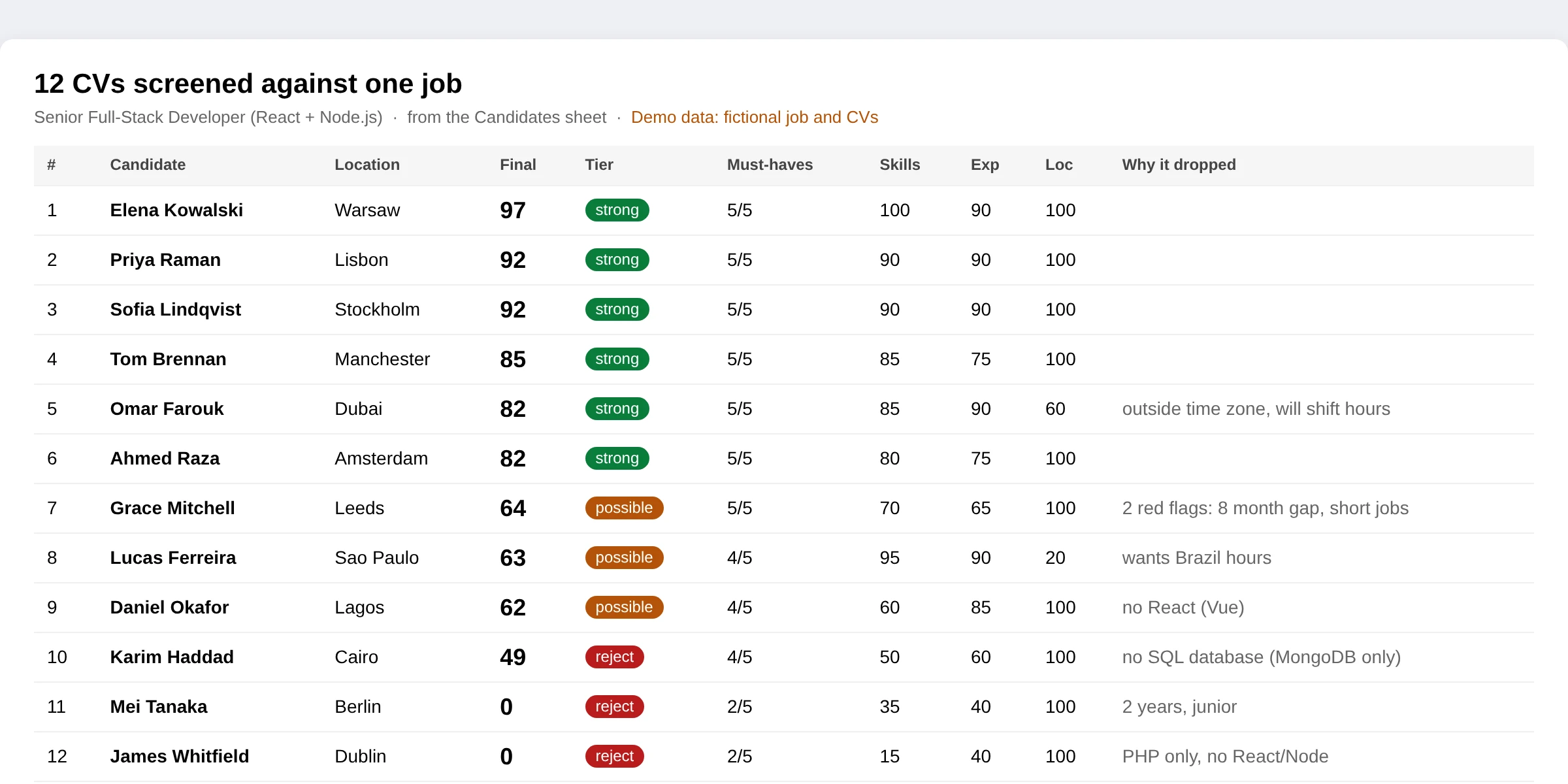
Demo run: 12 CVs screened and ranked, about 7 seconds each.
Fictional job, not a client: a Senior Full-Stack Developer (React + Node.js) role on UK hours, with 12 fictional CVs. Every CV went through the form and came out as a scored row in the Sheet.
What the scoring caught
Skills are not everything. One candidate had a skills score of 95 but wanted Brazil hours. Location 20 and a missed must-have brought the final score to 63.
Time zone is not a hard no. A candidate outside the time zone who said they would work UK hours got location 60 and still made the top 5 at 82.
Red flags cost points, not the job. One candidate met every must-have, but an 8 month gap and many short jobs cost 10 points and moved them to possible.
Ties get flagged. Two candidates tied at 82 for the last shortlist spot, so a person should look at number 6 too.
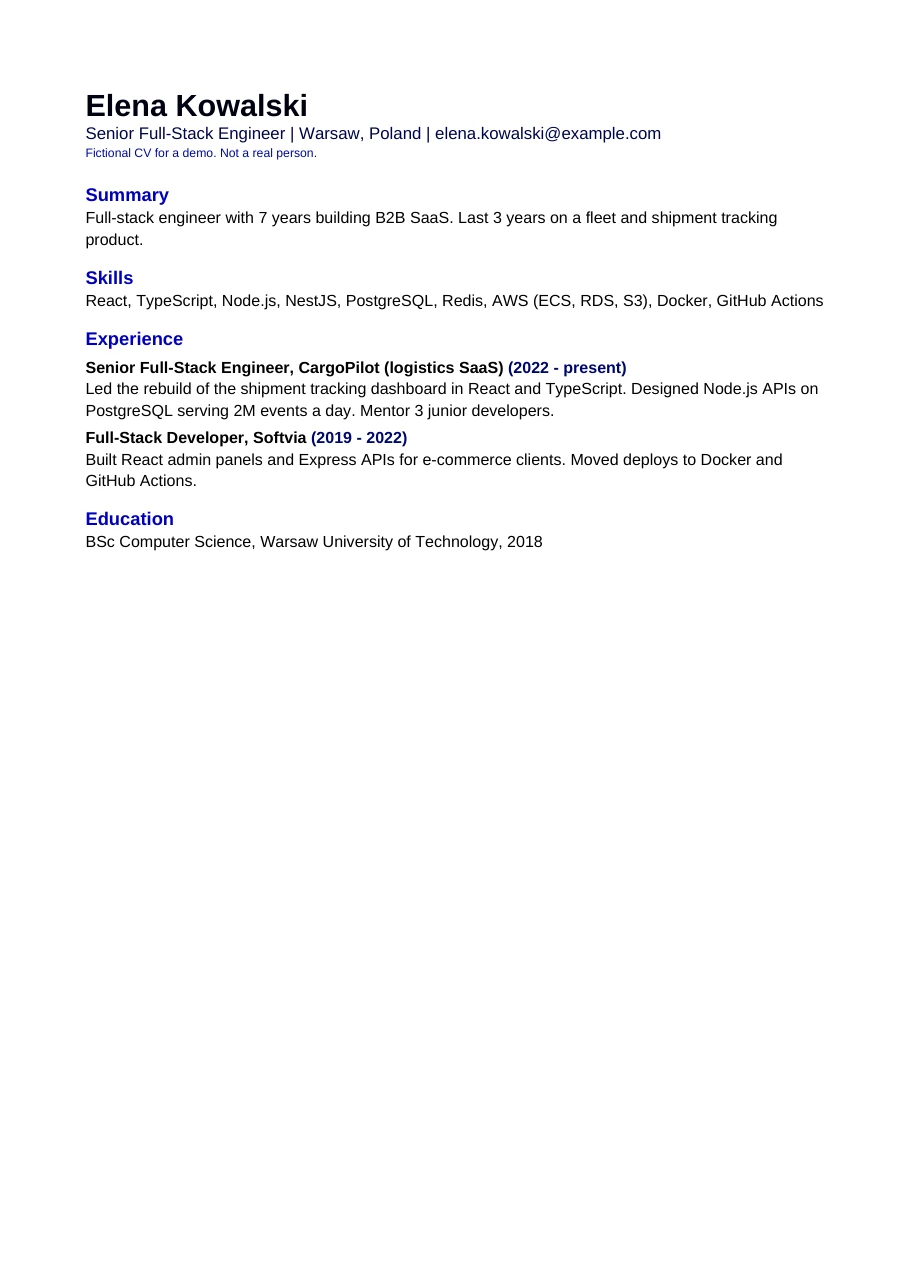
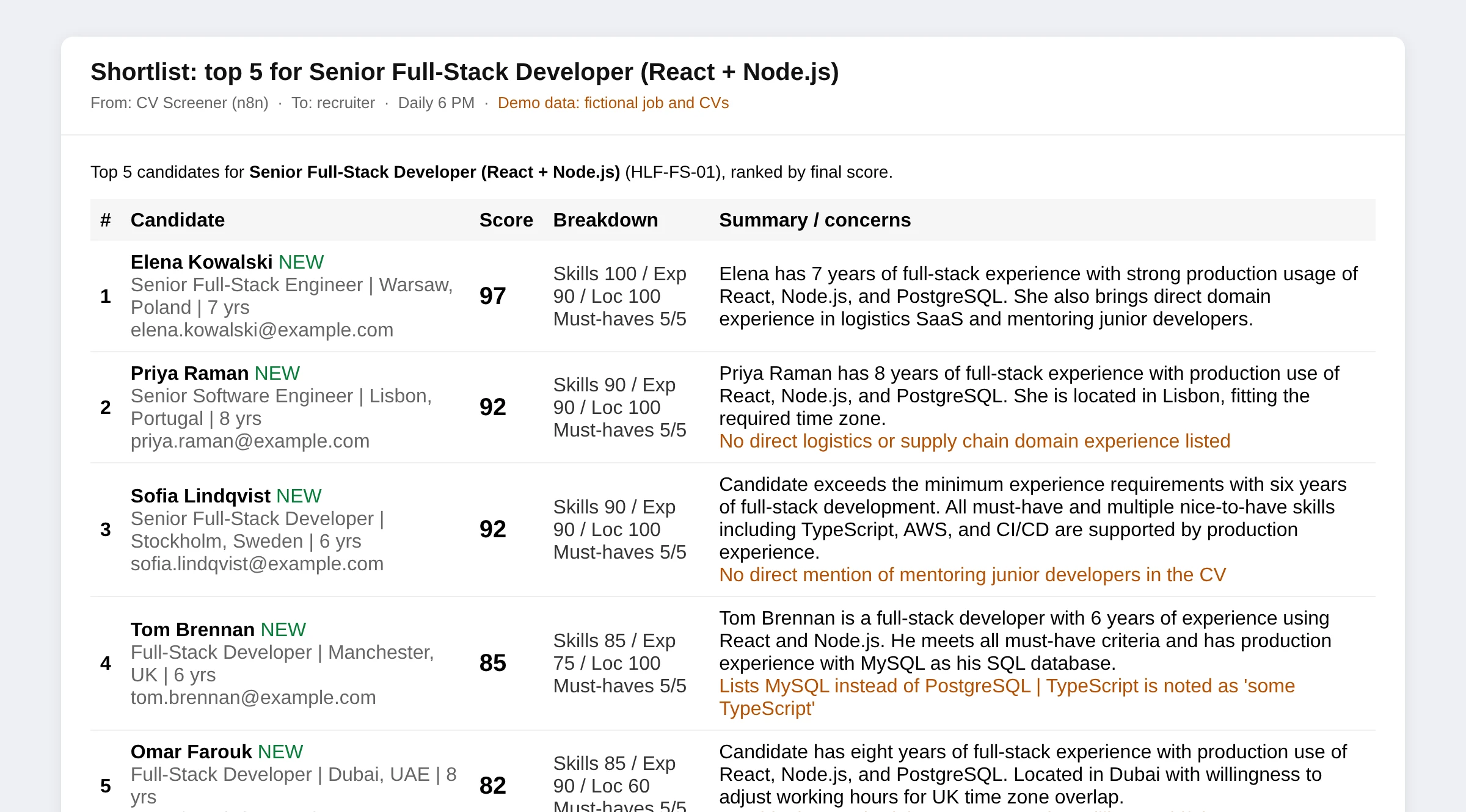
Demo data only. The job, the company and all 12 CVs are fictional. No real candidates or client data.
How it works: one workflow screens, one builds the daily shortlist.
CV Intake
Runs on every CV that comes in.
- CV comes inn8n form with PDF upload, or email over IMAP
- Read the PDFText extracted, scanned PDFs go to needs_review
- ScreenGemini checks each must-have with an evidence quote and gives skills, experience and location sub scores
- Score and logCode calculates the final score, one row added to the Sheet
- AcknowledgeOptional short email to the candidate, no score in it
Daily Shortlist
Runs every day at 6 PM.
- Read the SheetAll candidates for the job
- Pick the top 5Ranked by final score
- Email the recruiterScores, breakdown, summary and concerns
- Mark shortlistedStatus updated in the Sheet
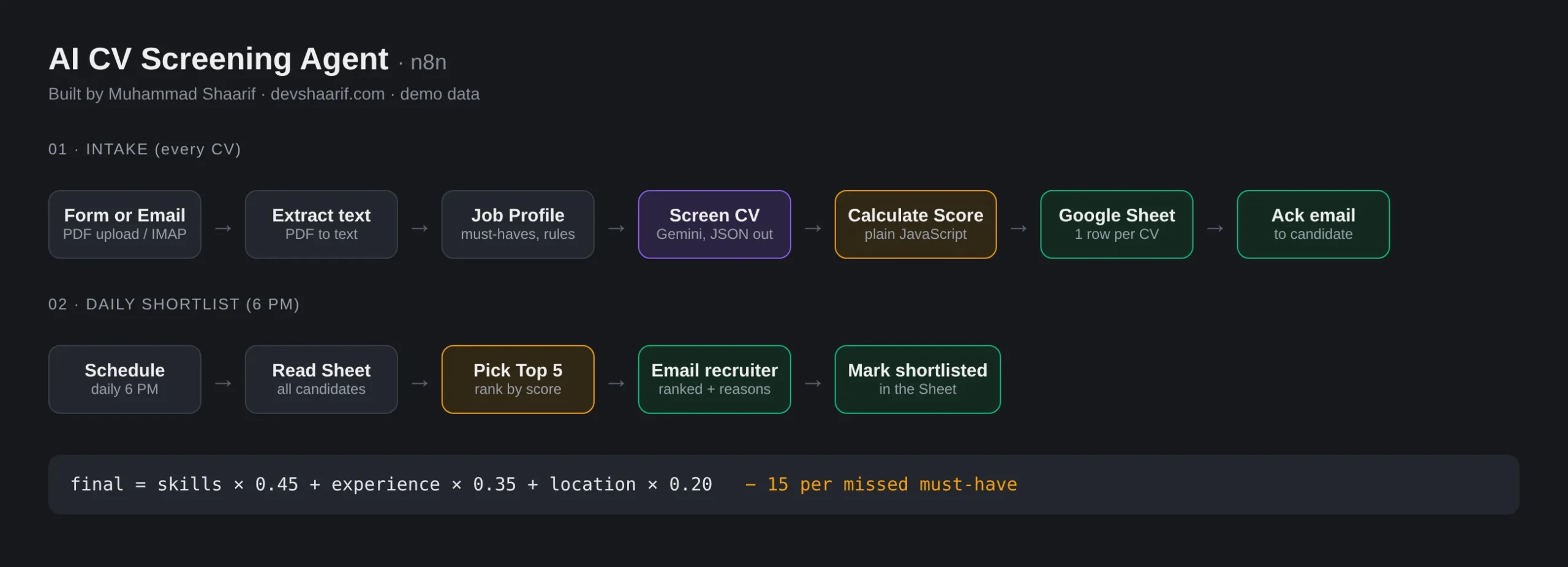
The AI gives evidence. Code decides the score.
Gemini returns three sub scores and a met or not met for each must-have. The final score and tier are plain JavaScript in the Calculate Score node, so the same CV always gets the same score, the weights can change without touching the prompt, and you can show a hiring manager exactly why someone ranked where they did.
final = skills * 0.45
      + experience * 0.35
      + location * 0.20

-15 for each must-have not met
-10 if below the minimum years
-10 if 2 or more red flags

strong    >= 75 and every must-have met
possible  55 to 74
reject    < 55
Score weights
How much each AI sub score counts toward the final score.
From the Calculate Score node in the workflow.
Key decisions and why I made them.
It never auto-rejects
The score sorts the pile. A person reads the CVs and makes the decision, and no candidate gets a rejection from the workflow.
Personal details are ignored
The prompt tells the model to ignore age, gender, nationality, name, photo and university prestige. Location only counts through the job’s time zone rule.
Every must-have has proof
Each must-have comes with a quote from the CV, so the recruiter can check a score in seconds instead of trusting it.
Reusable for any job
Title, must-haves, minimum years and the location rule live in one Job Profile node. Change those values and the same workflow screens for a different role.
Limits
PDF only. Scanned PDFs with no text layer are logged as needs_review instead of being scored.
AI scores are a first pass. The model can misread dates or miss a skill written in an unusual way, which is why the evidence quotes are there.
One job per workflow copy. For more jobs, duplicate the workflow and change the Job Profile.
With real candidates, check your data protection rules (for example GDPR) and tell candidates how their CV is processed.
Run it yourself: setup in 8 steps.
Everything is on GitHub: the 3 workflow files, prompts, output schema, Sheet columns and 12 sample fictional CVs. The full guide is in the README.
Tech stack
- Google SheetCreate it and share it with your Google service account email as Editor
- ImportThe 3 JSON files in n8n: Workflows, Add workflow, Import from File
- CredentialsGoogle Service Account, Google Gemini API (free key from Google AI Studio), SMTP, and IMAP if you want email applications
- PlaceholdersSheet ID, your email and name, your job in the Job Profile node, IMAP start date
- Run setup once00 Setup creates the Candidates tab
- TestExecute workflow 01 and upload a PDF CV in the form
- ShortlistRun workflow 02 with Run Now to get the shortlist email
- PublishTurn on workflows 01 and 02